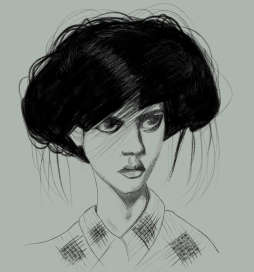
Andrea

This was so much fun to draw. I used to hate drawing hair, I was always overwhelmed by it, and curly hair still sometimes terrifies me but Andrea’s hair was fabulous to draw.

I drew this portrait on my iPad Pro with an Apple Pencil using the Procreate app.

Vez

This portrait of Vez was a fun draw but the most remarkable thing about it for me is that I’ve somehow rejuvenated Vez, by around 10-20 years! If anything I usually make my subjects look a little older than their actual age and this is certainly the first time I’ve made someone look so much younger! I wish I knew how I’d done it because I suspect this would be guaranteed to keep the commissions flooding in.

I drew Vez on my iPad Pro with a 2nd Generation Apple Pencil using the Procreate app.

Abra

I took a Skillshare class last week on Metallic textures in Procreate with my favourite Skillshare teacher, Liz Kohler-Brown, and I managed to use the technique I learned on that class to draw the gold earrings and necklace in this portrait. I’m very proud of myself because this is quite a stretch from what we were doing in the class! And this is the beautiful Abra, who offered the perfect for experimenting with both this technique and more of Procreate’s great new updates brushes. I used the wet acrylic on her face and then several different drawing brushes on her hair and lips.

I drew Abra on my iPad Pro using a 2nd gen Apple Pencil and the Procreate app.

Kiany

I drew Kiany’s portrait on my iPad Pro with an Apple Pencil using the Procreate app.

Amanda

With the iPad drawing app Procreate’s latest update (Procreate 5) they included some new drawing brushes plus updated versions of existing brushes and I’m having a lot of fun trying out the new brushes. I wasn’t a huge fan of many of the old brushes and much preferred brushes I’d bought on the (very large) independent marketplace for artist-created brushes.

Anyone who follows this blog will know that my favourite brushes are the Bardot brushes made by artist and creator Lisa Bardot. But Procreate have seriously raised their game with this latest update. Both the new and existing but improved brushes I’ve tried so far are massive improvements on the old brushes. For this portrait of Sktchy muse Amanda I used the acrylic, wet acrylic, salamanca and stucco brushes, plus my usual Blackwing pencil brush for the highlights in the hair.

Drawn on my iPad Pro with a 2nd Gen Apple Pencil using Procreate 5.

Jezori

I needed to draw a portrait with some colour today and Jezori’s inspiration photo for this one totally fitted the bill. It also gave me an opportunity to experiment some more with a range of Procreate brushes and tools to create some interesting effects. I used the smudge tool a lot, but very lightly, to blur the circles of colour together to try to get a neon effect, and also on that light green in the background. I used it again on the blue colour (drawn with a pastel brush) to very gently smudge the shadows and the highlights into each other. I’m not generally a fan of the smudge tool and can only really get it to work for me if I use it on a very low opacity and very, very gently.

I drew Jezori on my iPad Pro with an Apple Pencil using the Procreate app.

Funkfu

Today’s portrait is of Funkfu. This week’s Sktchy challenge is to draw a blind portrait (that is, a contour drawing without looking at the page and without lifting your pen from the paper until the drawing is finished) so this is a blind portrait of Funkfu, drawn on my iPad Pro using the Procreate app.

Olivia

This is Olivia, drawn on my iPad Pro in Procreate using Liz Kohler’s great digital watercolour brushes. If you’re interested in my method I’ve uploaded a Procreate timelapse to my YouTube channel here.

Jenny, the Snow Queen

Today’s portrait is of Jenny, and all I could think of as I was drawing this portrait was the fairytale The Snow Queen. All the time I’m drawing I’m having a conversation with my subject and as I was drawing this I was most definitely talking to the Snow Queen, more than with Jenny 🙂

I drew Jenny on my iPad Pro with an Apple Pencil using the Procreate app.

Ogim

I haven’t managed to post many Christmas cards this year but I have managed to draw one Christmas portrait – of the very handsome Ogim, dressed up in his Christmas hat. This is my way of wishing all my followers a very Merry Christmas or happy holidays if you don’t celebrate Christmas.

I played with some of the new Procreate brushes to create this portrait, mostly the Hartz and Aurora brushes. I’ve also turned the portrait into a GIF – my first ever use of the animation feature in Procreate, which was fun. You can see that in action on my Instagram feed.

I drew Ogim in Procreate 5 on my iPad Pro using an Apple Pencil.

P.S. I’ve just discovered that Instagram doesn’t allow GIFs, so you can see the GIF on my Twitter account here .