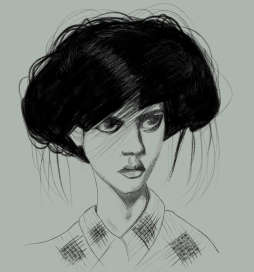
Amanda

With the iPad drawing app Procreate’s latest update (Procreate 5) they included some new drawing brushes plus updated versions of existing brushes and I’m having a lot of fun trying out the new brushes. I wasn’t a huge fan of many of the old brushes and much preferred brushes I’d bought on the (very large) independent marketplace for artist-created brushes.

Anyone who follows this blog will know that my favourite brushes are the Bardot brushes made by artist and creator Lisa Bardot. But Procreate have seriously raised their game with this latest update. Both the new and existing but improved brushes I’ve tried so far are massive improvements on the old brushes. For this portrait of Sktchy muse Amanda I used the acrylic, wet acrylic, salamanca and stucco brushes, plus my usual Blackwing pencil brush for the highlights in the hair.

Drawn on my iPad Pro with a 2nd Gen Apple Pencil using Procreate 5.

Rick

This week’s Old School Sktchy weekly art extravaganza (wax) challenge theme is “historical”, and when choosing a photo I knew I only needed to visit Rick’s Sktchy photo collection to find an inspiration photo to draw from. Rick is probably the most well known Sktchy muse. He has a huge collection of more than a thousand inspiration photos, in a massive range of costumes and poses. He also very open to suggestions from artists if someone has an idea for an new costume he might pose in. So a quick hunt through Rick’s photos turned up the inspiration photo for this portrait, which wouldn’t look out of place on a miniature in the Victoria & Albert Museum.

I drew Rick in my Moleskine sketchbook with a Micron fineliner, Copic markers and coloured pencils.

Grace

This is Grace, painted with Zecchi Toscana watercolours and finished with coloured pencils in my Moleskine watercolour sketchbook. It’s a reasonable likeness except that Grace is much prettier than this. All the features are just slightly off – the eyes and nose a little too large, the mouth not quite right. This often happens in my portraits and I don’t generally worry about it too much because I usually like the portrait well enough nevertheless. But in this portrait it has all combined to create a portrait that just doesn’t work.

I could have just left the portrait in my sketchbook and not shared it but, for me, sharing what doesn’t work is just as important as sharing the work I’m proud of. I’m learning with every portrait I create and it means so much more if I can share that learning. What I learned from this portrait is that sometimes I can be lazy, I can take it for granted that my portraits will turn out well even when my initial sketches are slightly off. Taking the time to revisit the sketch, check proportions and make corrections is probably well worth doing.

If you’ve learned useful lessons from your regular art practice I’d be interested to hear them.

Jezori

I needed to draw a portrait with some colour today and Jezori’s inspiration photo for this one totally fitted the bill. It also gave me an opportunity to experiment some more with a range of Procreate brushes and tools to create some interesting effects. I used the smudge tool a lot, but very lightly, to blur the circles of colour together to try to get a neon effect, and also on that light green in the background. I used it again on the blue colour (drawn with a pastel brush) to very gently smudge the shadows and the highlights into each other. I’m not generally a fan of the smudge tool and can only really get it to work for me if I use it on a very low opacity and very, very gently.

I drew Jezori on my iPad Pro with an Apple Pencil using the Procreate app.

Avonlea

This is Sktchy muse Avonlea. I love the way the light casts a shadow down the left side of her face and across her eyes in the inspiration photo for this portrait, and capturing that without darkening her eyes too much was my main focus when drawing. I’m so happy with the finished portrait; I really feel like it’s the best I could have done right now and that’s all I can ask of myself.

I drew Avonlea in my A4 Moleskine sketchbook with a Micron fineliner, Copic markers and Prismacolor coloured pencils.

Funkfu

Today’s portrait is of Funkfu. This week’s Sktchy challenge is to draw a blind portrait (that is, a contour drawing without looking at the page and without lifting your pen from the paper until the drawing is finished) so this is a blind portrait of Funkfu, drawn on my iPad Pro using the Procreate app.

Tina’s son

I’m starting 2020 with a little watercolour of Tina’s son. I don’t know his name but I loved the photo of him she posted on Sktchy. I love to try to capture different expressions in my portraits and this one is just great! It’s all in the eyes and the eyebrows.

I drew the portrait in my Moleskine watercolour sketchbook with a Micron .01 fineliner, painted with Zecchi Toscana watercolours and finished it off with Prismacolor coloured pencils.

Olivia

This is Olivia, drawn on my iPad Pro in Procreate using Liz Kohler’s great digital watercolour brushes. If you’re interested in my method I’ve uploaded a Procreate timelapse to my YouTube channel here.

Jezori

I’m still practicing with those ballpoint pens when I get the chance. I drew Jezori’s portrait in my tiny Moleskine sketchbook with a 4-colour Bic ballpoint.

Scott

This is Sktchy muse Scott and this is the kind of Sktchy inspiration photo that is irresistible for me. I love these kind of ‘altered perspective through glasses’ photos and that pipe is fantastic. I wasn’t sure I’d be able to draw the pipe initially but I figured if I messed it up I could crop it out and just include the pipe stem in my portrait (these kinds of cheats are essential to my drawing practice 😂) but in the end I was happy enough with how it turned out. It’s a little large but I wasn’t going to worry too much about that.

I drew Scott in my A4 Moleskine sketchbook with Copic markers and a white gel pen.